The Exact Requirements to Start Webcam Modeling Plus the Checklist You Need to Pass
Discover the exact requirements to become a webcam model plus a practical checklist covering gear, ID, setup, and legal must-haves to pass and start today.
If you’re researching the exact requirements to become a webcam model, you’ve likely hit a wall of vague advice and missing checklists. This guide cuts through the noise. You’ll get the concrete, non-negotiable criteria—from legal age and ID verification to tech specs and payout thresholds—plus a step-by-step checklist to pass before your first live show. By the end, you’ll know precisely what to prepare, what to avoid, and exactly how to submit your application so you don’t get rejected on a technicality.
Start by confirming you meet the baseline legal and identity rules. You must be at least 18 years old, and you’ll need a government-issued ID—passport, driver’s license, or national ID card—ready for verification. Most platforms also require a clear, recent photo of your face to match against that ID. Don’t skip this step; blurry or mismatched documents are the top reason applications get bounced.
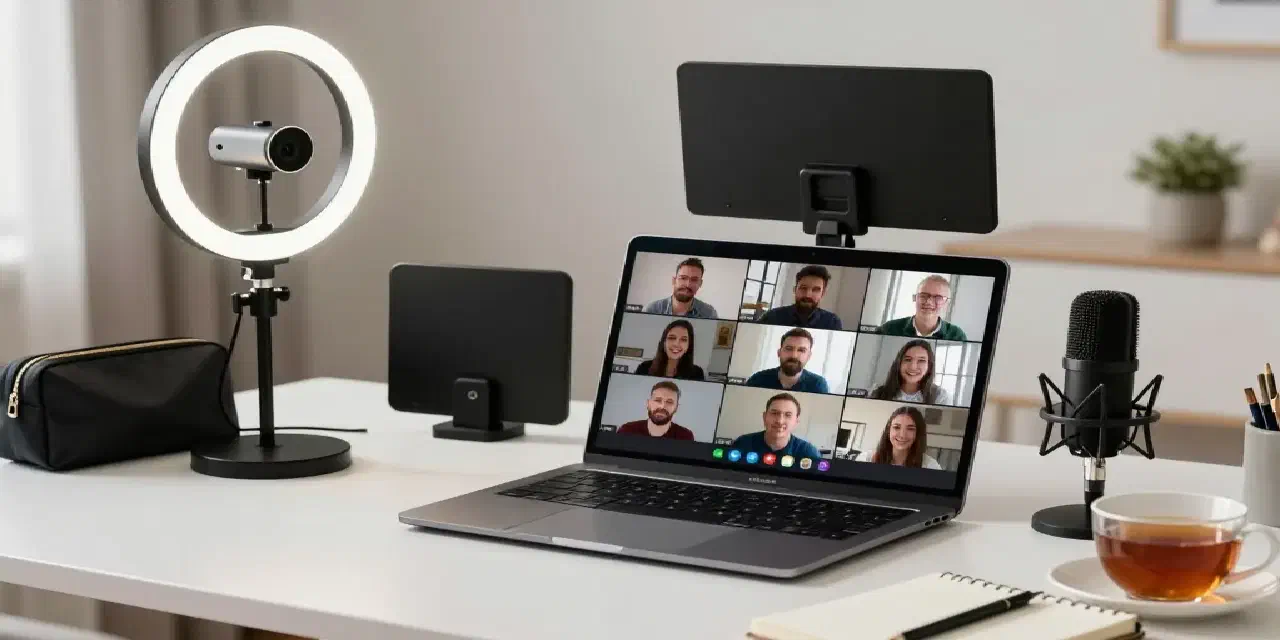
Next, lock down your tech setup before you apply. You’ll need a reliable computer or laptop, not a phone, for streaming. A high-definition webcam—720p minimum, 1080p recommended—is non-negotiable. Your internet connection must handle a stable upload speed of at least 5 Mbps; test it at a site like Speedtest.net to confirm. A quiet, private space with good lighting is also part of the package; natural light or a ring light works best.
Now, prepare your application materials in advance. You’ll submit your ID, a face verification photo, and sometimes a short video introduction. Have your payout details handy—bank account or payment service info—because you’ll need to set that up during registration. Check each platform’s payout threshold, typically $50 to $100, and their payment schedule, so you know when you’ll see your first earnings.
Before you hit submit, run through this checklist: your ID is valid and unexpired, your face photo matches it exactly, your webcam and internet pass the platform’s system test, and your payout method is correct. Double-check your profile details for typos, as errors can delay approval. Once you’ve verified everything, submit your application and wait for the review—usually 24 to 72 hours.
Avoid common pitfalls that cause rejection. Don’t use a virtual background or heavy filters; platforms need a clear view of you. Don’t submit a photo with sunglasses or a hat. Don’t rush the payout setup—incorrect bank details can freeze your funds. And never share your login or verification codes with anyone, even if they promise to help you get approved faster.
After you’re approved, your next step is to set up your streaming space and schedule your first show. Test your equipment one more time, do a quick audio and video check, and start with a short session to build confidence. You’re now ready to go live—stick to these requirements, and you’ll avoid the technicalities that trip up most new models.
What Are the Legal Requirements to Become a Webcam Model
Before you set up your camera or create a profile, you need to clear the legal and administrative hurdles that every legitimate platform enforces. These rules exist to protect you, the platform, and viewers. Skip any of them, and your application gets rejected instantly. Here is the exact breakdown of what you must prove, prepare, and agree to before your first live stream.
The Minimum Age and Identity Verification Rules
You must be at least 18 years old to become a webcam model. This is non-negotiable across every reputable platform. There is no exception for parental consent, emancipation, or being “almost 18.” You will need to verify your age with a government-issued photo ID—a passport, driver’s license, or national identity card all work. The ID must show your full legal name, date of birth, and a clear photo that matches your current appearance.
Age is only the first step. Platforms also require a two-step identity verification process. First, upload a clear photo of your ID, front and back. Second, take a live selfie or short video holding the same ID next to your face. Some platforms run a quick facial recognition scan to confirm the person in the ID is the person on camera. Do not attempt to use someone else’s ID, alter your ID, or use an expired document. These actions lead to a permanent ban and may be reported to authorities. Your identity check typically completes within 24 to 72 hours after submission, and you cannot stream until it is approved.
The Paperwork You Must Prepare Before Signing Up
Before you click “apply,” gather these documents so you do not stall your approval:
- A valid, unexpired government-issued photo ID (passport or driver’s license preferred).
- A recent utility bill, bank statement, or official letter with your name and current address for proof of residence.
- A tax form—in the U.S., this is a W-9; internationally, you may need a W-8BEN or your country’s equivalent tax declaration.
- A signed model release form, which the platform will provide, stating you consent to the recording and distribution of your content.
- A clear, recent headshot for your profile (not required for approval but speeds up your profile setup).
Most platforms require you to complete a tax interview during signup. You will declare your legal name, tax ID or social security number, and residency status. If you are an independent contractor, you are responsible for reporting your own income. Do not falsify any financial information—this can trigger audits and legal penalties. Keep digital copies of every document you submit and store them in a secure folder. You will also need to provide a valid payout method, such as a bank account, PayPal, or direct deposit details. Some platforms require this to match the name on your ID exactly.
The Platform Rules You Must Agree to Follow
Each platform has its own terms of service, but the core rules are remarkably consistent. You must agree to perform only legal, consensual acts that fall within the platform’s allowed categories. This typically prohibits anything involving minors, non-consent scenarios, illegal substances, or public spaces where you could be seen by others. You must also agree to never record or broadcast anyone else without their explicit, documented consent. If you work with a partner, that partner must undergo full identity verification and sign their own model release form.
You will be required to follow strict content moderation rules. These include a ban on recording your stream without permission, using copyrighted music or images, and promoting external payment links for off-platform transactions. Most platforms also enforce a “no screenshots” policy for viewers, but you must agree to report any unauthorized recording. Finally, you must accept that the platform can terminate your account at any time for violating these rules, and you forfeit unpaid earnings if you breach the terms. Read the full terms of service before you sign. Bookmark the policy page so you can check updates—rules change frequently, and ignorance is never accepted as an excuse.
What Technical Requirements Do You Need to Start Webcam Modeling
Before you hit “Go Live,” your setup must meet a baseline standard that keeps your stream stable, your image sharp, and your audio clear. You don’t need a broadcast studio—just a few pieces of gear that work together reliably. Here’s the exact technical checklist to pass platform requirements and avoid mid-show crashes.
The Internet Speed and Device Specs That Actually Work
Your internet connection is the single most critical requirement to become a webcam model—no upload speed, no show. You need a minimum of 10 Mbps upload for 720p streaming, but 15–25 Mbps is the safe zone for 1080p with a stable bitrate. Test your speed at least three times during peak evening hours, when your audience is online, using a wired Ethernet connection—not Wi-Fi. If your upload fluctuates below 5 Mbps, you’ll get dropped frames and viewers will leave.
For the device, a laptop or desktop with a quad-core processor from the last five years and 8 GB of RAM is the floor. You don’t need a gaming rig, but avoid anything older—encoding video chokes CPUs. Use a dedicated graphics card, even a mid-range one, to offload encoding if your streaming software supports hardware encoding. Also, run your stream on a separate device from your phone or tablet for chat moderation. A wired connection to your router is non-negotiable; if your router is far away, buy a powerline adapter instead of relying on Wi-Fi extenders. Finally, keep your operating system and streaming software updated before every session—platforms often require the latest security patches to pass pre-stream checks.
The Camera, Lighting, and Audio Setup You Need at Each Budget
Your visual and audio quality directly affects your earning potential, so don’t cheap out on the wrong items. Here’s a practical breakdown of what to buy at three budget tiers, with realistic price ranges for the core gear.
| Budget Tier | Camera | Lighting | Audio |
|---|---|---|---|
| Starter (under €200 total) | Logitech C920 or similar 1080p webcam | Two softbox lamps with daylight bulbs (from €40 to €80 per pair) | Clip-on lapel mic (from €15 to €30) |
| Mid-range (€200–€500 total) | DSLR or mirrorless camera with HDMI capture card (from €150 to €300 for camera + card) | Ring light 18-inch with tripod (from €60 to €120) | USB condenser mic (from €50 to €100) |
| Pro (€500+ total) | 4K camcorder or DSLR with clean HDMI out (from €400 to €800) | Three-point LED panel kit (from €150 to €300) | XLR mic with audio interface (from €100 to €200) |
At any budget, place your camera at eye level and angle it slightly downward, 10–15 degrees, to flatter your face. For lighting, never use a single overhead light—it creates harsh shadows. Position one softbox at 45 degrees to your left, another at 45 degrees to your right, and a small fill light behind your camera. For audio, avoid built-in laptop mics entirely; they pick up fan noise and echo. Test your audio by recording a 30-second clip and listening with headphones—if you hear hiss, raise your mic gain and move it closer to your mouth. A final tip: buy a second power strip with surge protection to avoid tripping breakers mid-show.
How to Set Up a Private Space That Passes Platform Review
Platforms require that your streaming area is private, secure, and free from personal identifying details—this is a hard requirement to become a webcam model, not a suggestion. Start with a room that has a lockable door and no windows visible in frame. If windows are unavoidable, cover them with blackout curtains and pin them closed so no outside light or shapes show. Remove all personal items from the camera view: family photos, mail with your name, diplomas, license plates, and any electronics with visible logos that could be traced to you.
Next, create a clean backdrop. A plain painted wall or a fabric backdrop stand, from €30 to €80, works best. Avoid patterned wallpaper or cluttered shelves—these distract viewers and give away your location. Check your reflection in any mirrors, glass frames, or glossy surfaces behind you; tape over or remove them. Also, ensure your streaming area is soundproof enough that roommates or neighbors can’t be heard—use a door draft stopper and a white noise machine, from €20 to €50, just outside the room. Finally, before your first live stream, do a 10-minute test recording and review it for accidental exposure of your address, your phone’s notifications, or your real name appearing on a background screen. If anything shows, reposition the camera or blur the area with a virtual background—but only if your streaming software supports it without lag.
What Payment and Tax Requirements Apply to Webcam Models
Before you go live, sort out the financial backbone of your business. This isn’t just about getting paid—it’s about staying legal, dodging tax-time surprises, and keeping more of what you earn. The requirements to become a webcam model go beyond a camera and a clean room; you need a solid grasp of payouts, tax obligations, and the fees that quietly eat into your income. Get these three areas right from day one, and you’ll operate with confidence instead of scrambling later.
The Payout Methods You Must Have to Receive Your Earnings
Your payout method is your lifeline, so don’t leave it to chance. Most camming platforms offer several withdrawal options, but you need to know which ones work in your country and which carry the lowest fees. Start by setting up a verified account with at least two payout methods—this protects you if one service goes down or freezes your funds. Common options include direct bank transfer (ACH or SEPA), PayPal, Paxum, Cosmo Payment, and wire transfers. For U.S. models, direct deposit is usually the cheapest; for European models, SEPA transfers are standard and fast. International models often rely on Paxum or Cosmo because they’re adult-industry friendly and avoid the chargebacks that PayPal sometimes triggers for adult work.
Here’s a practical checklist for your payout setup:
- Verify your identity on the platform with a government-issued ID and a selfie.
- Link a bank account or e-wallet that accepts adult-industry funds without freezing them.
- Check the minimum payout threshold—typically from $20 to $100 per withdrawal.
- Set up automatic payouts if available, so you’re not tempted to spend what you haven’t withdrawn.
- Test a small withdrawal during your first week to confirm the funds land correctly.
Don’t rely on a single method. If your primary option fails, you’ll have no income for weeks. Also, watch out for payout processing times—some take 24 hours, others take up to a week. Plan your cash flow around that lag, especially in your first month.
How to Handle Taxes and Income Reporting in Your Country
Taxes are the least glamorous part of camming, but ignoring them is the fastest way to lose money. In the U.S., you’ll receive a 1099 form if you earn over $600 on a platform, and you’ll file as an independent contractor. That means you owe self-employment tax (Social Security and Medicare) plus federal income tax. In the U.K., you’ll need to register as self-employed with HMRC and file a Self Assessment tax return. In Canada, you report camming income as business income on your T1 form. Australia requires you to declare it as personal services income. The rule is universal: if you earn it, you report it.
Set aside 25% to 35% of every payout in a separate savings account for taxes—that’s a realistic range for most models, though your actual rate depends on your total income and deductions. Track every expense: camera equipment, lighting, internet, props, outfits, even a portion of your rent if you use a dedicated room. These deductions lower your taxable income, so keep receipts and log mileage if you travel to shoot. Use a simple spreadsheet or accounting app from day one; don’t wait until April to reconstruct six months of earnings. If you’re unsure about your country’s specific rules, pay a one-time consultation with a tax professional who understands adult-industry work—it’s worth the cost to avoid penalties.
The Hidden Costs and Fees That Affect Your Take-Home Pay
Your hourly rate on camera is not your actual earnings. Platforms take a cut of every token or tip, and that cut varies wildly. Most sites keep 40% to 60% of your gross earnings, meaning you’ll receive only 40% to 60% of what viewers pay. For example, if a viewer spends $100 on tokens, you might take home from $40 to $60. That’s before any payout fees. On top of the platform cut, you’ll face withdrawal fees—Paxum charges a small per-transaction fee, bank wires can cost from $10 to $30 per transfer, and PayPal takes a percentage if it’s even allowed. Currency conversion fees also hit international models, typically 2% to 4% of the amount.
Don’t forget the equipment and setup costs. A decent webcam runs from $50 to $200, a ring light from $20 to $80, and a high-quality microphone from $30 to $100. You’ll also spend on outfits, lingerie, and toys—budget from $50 to $150 per month to keep your content fresh. Internet upgrades or a private space rental add more. The key is to calculate your true hourly rate after all deductions. Track your earnings and expenses for your first month, then divide your net profit by hours streamed. If that number feels too low, adjust your pricing, stream during peak hours, or switch to a platform with a higher payout percentage.
The single biggest mistake new models make is celebrating gross earnings before subtracting platform fees, taxes, and equipment costs—your net profit is the only number that matters.
What Practical Requirements Are Needed to Pass Your First Live Stream
Before you hit “Start Broadcast,” you must clear several hard gates: platform verification, a test stream, and a content review that checks your ID, room setup, and lighting. Many platforms reject new models within the first 24 hours simply because they skipped the technical pre-checks. Treat your first stream like a job interview, not a casual chat—the algorithm and moderators are both watching.
The Pre-Stream Checklist to Pass the Content Review and Test Stream
Start by gathering the exact documents and gear every major platform expects. You’ll need a government-issued photo ID (passport or driver’s license), a signed model release if you appear with anyone else, and a clean, well-lit room free of personal identifiers like mail, diplomas, or family photos. Next, run a 10-minute test stream to check your internet upload speed—aim for at least 10 Mbps—and your camera framing. Most platforms require your face to be visible for at least the first 5 minutes of any show, so position your camera at eye level and avoid harsh overhead lighting.
Here’s a practical pre-stream checklist to pass the review without a rejection:
- Verify your ID and model release are uploaded and approved at least 48 hours before your first show.
- Test your mic and camera with the platform’s built-in diagnostic tool, not your phone.
- Set your room background to a plain wall or a neutral curtain, and remove any brand logos or screens.
- Check your internet speed twice—once at peak evening hours and once in the morning.
- Prepare a tip menu with clear prices and services, and have it visible on a second screen or printed card.
After the test stream, the platform will likely run a short content review. Keep your first show clothed or in lingerie for the first 15 minutes. This gives moderators time to verify your identity and cuts the risk of an instant ban for nudity before verification is complete.
The Do’s and Don’ts During Your First Show to Avoid Bans
The most common reason for a ban during a live stream is breaking explicit content rules—like showing sexual acts prohibited on mainstream sites or engaging with users who request illegal activities. Do keep a timer and log off after your scheduled end time, because many platforms auto-scan the last 5 minutes of a stream for violations. Do read the chat actively and respond to regulars. But don’t acknowledge or repeat any user messages that mention minors, non-consensual acts, or off-platform payments—mute and block those users immediately.
Don’t use copyrighted music in your background, even if it’s quiet; the audio fingerprint will trigger a strike. Don’t show your face and full body in the same frame if you’re in a country where adult work is restricted—use a mask or a partial angle instead. Do have a pre-written list of your own boundaries, and don’t feel pressured to perform any act not on your tip menu. If a user asks for a private show, switch to the platform’s private chat feature rather than doing it in the public room—that’s a rule on almost every site.
The single most effective habit is to end your stream 10 minutes early if you feel tired or distracted; a bad final segment is what gets most new models flagged.
How to Protect Your Privacy and Stay Compliant With Local Laws
Your privacy setup starts before you turn on the camera. Use a dedicated email address and a stage name with no connection to your real name, and never share your location, city, or time zone in chat. Set up a VPN on your router—not just your computer—to hide your IP address from the platform and viewers. For payment, use the platform’s built-in payout system. Never accept direct transfers, gift cards, or crypto from users, as that violates tax and anti-money-laundering rules on most platforms.
Legally, you must check your local laws on adult content creation. In many U.S. states, you need to be 18 or older and register as self-employed. In countries like the UK or Canada, you may need to declare your income as freelance. Some platforms require a W-9 or equivalent tax form before your first payout, so have your tax ID or social security number ready. If you live in a country where adult work is illegal, do not stream from home—use a co-working space or studio that permits this activity, and never show identifying documents on camera.
Finally, keep a digital folder with your signed model release, ID, and tax forms—you’ll need to re-verify annually on most sites. If a platform asks for a live verification video, do it in a separate room with no background clues, and cover any tattoos or birthmarks that could identify you in your personal life. Your goal is to be a professional on camera, but a ghost off it—that’s the only way to sustain this work long-term without legal or personal blowback.
Conclusion
Meeting the requirements to become a webcam model comes down to preparation, not luck. You now have the full checklist: verified ID, a quiet private space, reliable camera and lighting, a payout method, and a clear grasp of your platform’s rules. Before going live, run through that checklist once more. Set up a test stream. Ask a friend to confirm your audio and video quality. The next move is straightforward: choose one platform, finish your application today, and book a short first session to build confidence. The requirements are met—now it’s time to act.
Frequently asked questions
What are the basic legal requirements to start camming?
Do I need any special equipment to begin, or can I use my phone?
What paperwork or documents do I need to sign up on a camming site?
Is there a minimum age or maximum age limit to become a webcam model?
Do I need any prior experience or specific skills to start camming?
What are the payment and banking requirements to receive earnings?
Are there any privacy or anonymity requirements I should know about before starting?
What are the health and safety requirements or recommendations for new models?
Do I need to verify my identity with every camming site, or can I reuse my verification?
What are the minimum technical requirements for streaming quality on most platforms?
Related guides
Your Step by Step Guide to Passing the Webcam Model Signup Process Without the Guesswork
Learn the webcam model signup process explained step by step. Avoid guesswork with checklists, do’s and don’ts, and clear next actions for fast approval.
Read more
The Complete Guide to Becoming a Webcam Model While Keeping Your Identity a Secret
Learn how to become a webcam model and stay anonymous with proven strategies, privacy tools, and step-by-step safety tips to protect your identity.
Read more
How to Start Webcam Modeling With No Experience and Make Money Your First Week
Learn how to start webcam modeling with no experience. Get actionable steps, gear tips, and proven tactics to earn money your first week.
Read more